.png)
The journey from inspection to action is often less smooth than it should be. When a technician completes a checklist, the real issues can still sit somewhere else. A defect gets created, but the context gets lost. Work orders are planned, but not always in a way that reflects how problems actually appear in the field.
The result is not failure. It is friction. Small gaps that, over time, slow teams down, create uncertainty, and make it harder to stay in control of what is happening across assets. This is exactly where the Shoreline Platform creates value. Not by adding more steps, but by connecting the ones that already exist, reducing friction and enabling teams to move seamlessly from inspection to execution.
Seeing the full picture during inspections
One of the most common questions during checklist reviews is also one of the simplest: where are the issues?
Until now, answering that meant jumping between views, checking defects separately, and piecing together the story step by step.
Now, that story is visible instantly.
With defects directly shown alongside each checklist step, you can immediately see what’s been flagged, where, and why. Each issue is linked, traceable, and accessible without breaking your flow.
It changes how checklists are used. They’re no longer just a record of what was done. They become a live view of risk, progress, and outstanding work.
Turning a simple answer into immediate action
When a technician looks at a checklist item, the decision is straightforward. It is either fine, not fine, or not relevant. But until now, that simple decision did not always translate cleanly into the system.
That is where delays happen. Follow-ups get missed or created too late, and important issues risk being disconnected from the inspection itself.
By introducing clear responses such as N/A, OK, and Not OK, each step now captures a structured outcome. More importantly, it directly drives the next step in the process.
When something is marked as Not OK, the system immediately guides the user to create a defect, pre-filled with the relevant context. There is no need to repeat information, no risk of losing details, and no ambiguity about what happens next.
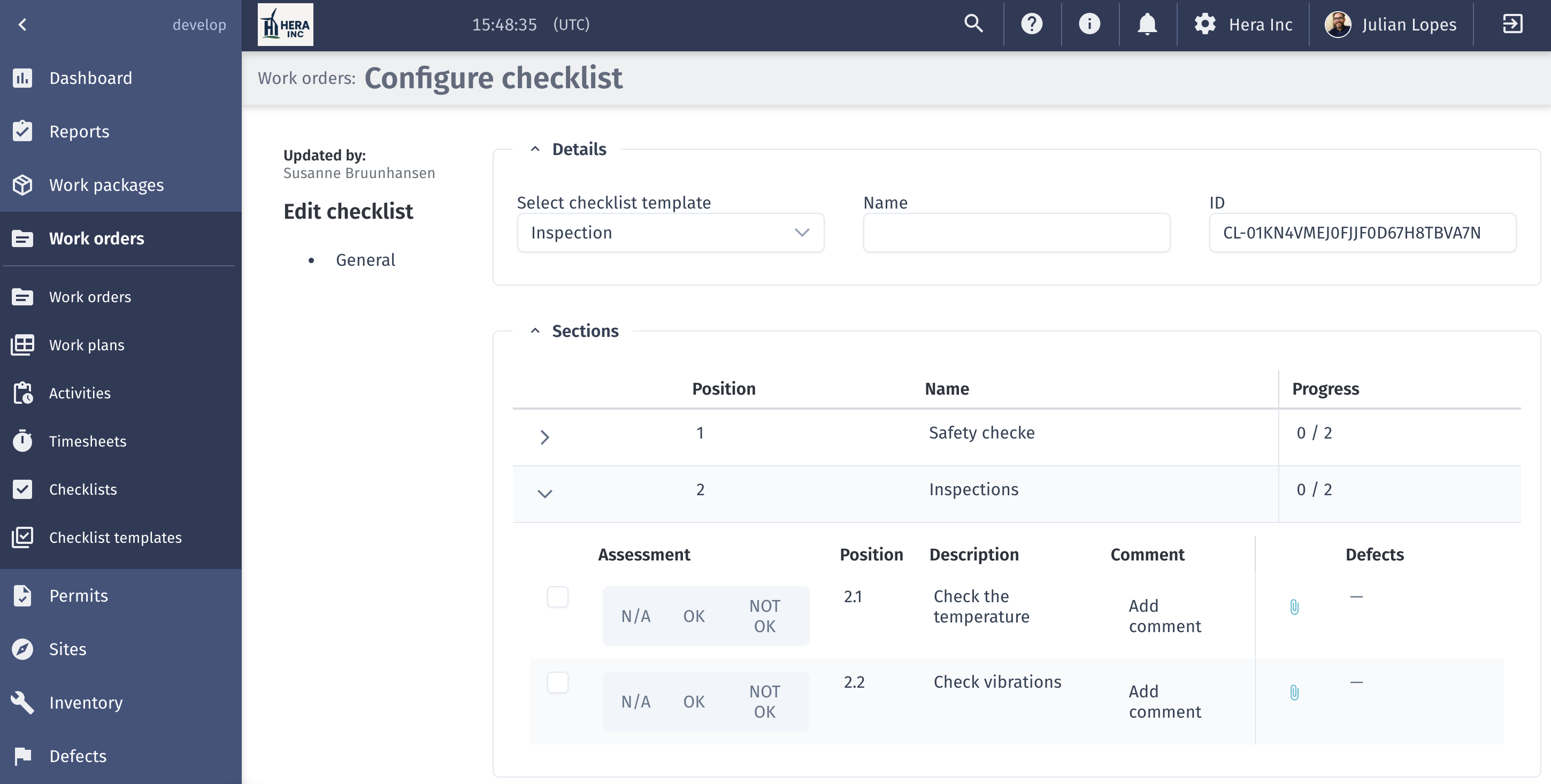
It shifts what happens next in the field. Instead of relying on follow-up actions or memory, the moment an issue is identified, it is immediately captured and set in motion. Nothing gets lost between observation and execution.
Making defects reflect reality, not process gaps
One of the challenges we have seen is that defects sometimes reflect the process more than the actual situation. A status changes too early. A record suggests action has been taken when it has not. Or a defect lingers without a clear resolution path.
We have addressed this by tightening how defects behave.
A defect now only moves forward when real progress happens, like when a work order is actually created, not just initiated. This removes false signals and keeps tracking aligned with reality.
At the same time, we have introduced a clearer way to close the loop when action is not needed. With the No Action Required status, teams can explicitly acknowledge a defect without forcing unnecessary work. The issue is logged, visible for audit, but no longer driving planning noise.
It is a more honest reflection of operations, where not every observation leads to intervention, but every observation is still accounted for.
Planning work the way problems actually appear
In real operations, issues rarely come in neat, isolated units.
Multiple defects often point to the same underlying problem. And sometimes a single issue requires several actions across teams or timelines.
Forcing a one-to-one relationship between defects and work orders creates unnecessary repetition and slows planning down.
By allowing teams to group multiple defects into a single work order, or split one defect into several actions, we are aligning the system with how work actually happens on site.
Planning becomes more flexible, more efficient, and ultimately more representative of the real-world challenges teams are solving.
Keeping context intact, wherever you are
One of the most common challenges when working with defects is understanding where they come from and what they are connected to.
Without that context, even simple tasks become harder. Users are left asking basic questions. Where did this come from? What is it linked to? Is this the right work order?
We have focused on removing that friction.
Work orders are now filtered based on the asset you are working on, so you only see what is relevant. Asset structures include clearer identifiers, making navigation more intuitive. And across defects, work orders, and checklists, everything is connected through direct, clickable links.
You do not have to search for the story anymore. It is already there, connected and visible, following you as you move through each step of the workflow.
A more connected way of working
What ties all of this together is not a single feature, but how each step connects across the full workflow, from inspection to resolution. It starts with the checklist, where a clear decision is captured at each step. When something is not OK, that decision directly leads to a registered defect, without losing context or additional input.
From there, the defect becomes the starting point for planning. Because it already carries the full context from the inspection, teams can move straight into defining the right action and creating work to resolve it. Planning is no longer a step disconnected from what was observed in the field, but a continuation of the same process.
The result is a workflow where inspection, decision, and execution are fully connected in one continuous flow. There are fewer breaks, fewer moments where users need to stop and interpret what to do next, and a clear path from identifying issues to resolving them. That is where real efficiency comes from, by removing friction between steps.
What is coming next
This is part of a broader shift toward more connected, more intelligent wind operations, where every step from inspection to execution is part of a continuous workflow.
More improvements are already on the way, building on this foundation and continuing to close the gaps between plan and reality. Click here to check what's coming next.